 AnalyticsCLI.com
 Your Coding Agent Is Guessing
Why product work gets vague when your agent cannot see the production signals behind the task.
AnalyticsCLI Team
May 7, 2026
Coding agents are good at implementation. They can edit files, write tests, and explain code.
But most product prompts ask them to guess.
The missing input is production evidence: where users drop, what changed in revenue, which release introduced friction, what reviews say, and which code surfaces are involved. AnalyticsCLI is built to make that context available before the agent recommends work.
The Problem Is Not Lack of Data
Most founders already have enough data to make better decisions. The problem is that it is scattered.
Analytics lives in one tool. Subscription data lives in RevenueCat or billing dashboards. Crashes live in Sentry. Store feedback lives in App Store Connect. Product decisions live in GitHub issues, Slack threads, and memory.
So when you ask Codex, OpenClaw, Claude Code, or Cursor for product advice, you often give it a weak prompt:
Users seem to drop off in onboarding. What should we improve?
The agent may produce plausible ideas, but it has no real basis for ranking them. It cannot know whether onboarding step two is the problem, whether a crash started after the last release, whether trial conversion changed, or whether users are complaining about the same thing in reviews.
Better Prompts Need Production Context
The better prompt is not longer. It is better grounded.
Instead of pasting screenshots into chat, the agent should be able to inspect bounded production signals:
- funnel dropoff by release
- paywall views and purchase outcomes
- RevenueCat trial and churn signals
- Sentry crashes and performance issues
- App Store reviews and ratings
- product feedback themes
- GitHub file context for the affected screen
That turns the task from “brainstorm growth ideas” into “rank the most likely product improvement from this evidence and write the implementation task.”
What This Looks Like In Practice
Imagine a mobile app where activation dropped after a new onboarding release.
A manual workflow might look like this:
- Open the analytics dashboard.
- Notice a funnel drop.
- Open Sentry and check if anything broke.
- Open RevenueCat and look for trial conversion changes.
- Read a few reviews.
- Ask an AI coding agent to suggest a fix.
- Manually explain where the onboarding code lives.
That is a lot of switching, and most founders skip steps when they are busy.
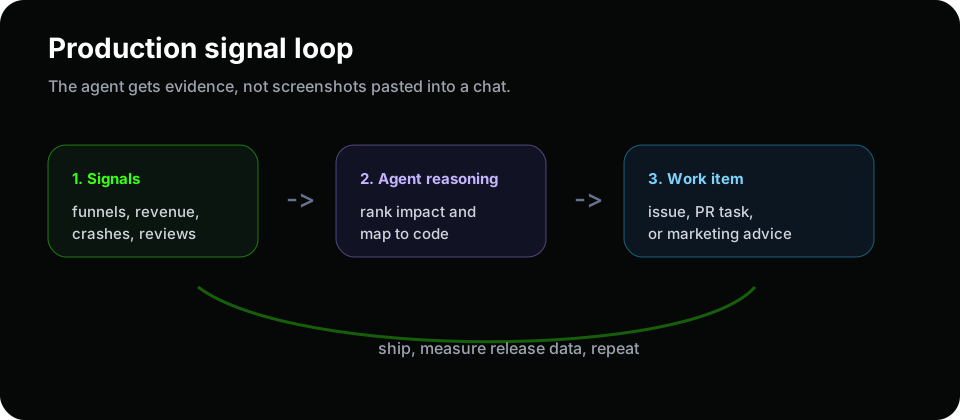
With AnalyticsCLI and the AI Growth Engineer, the workflow can be tighter:
- The agent reads the relevant production signals.
- It ranks the opportunity by impact.
- It maps the issue to likely code surfaces.
- It drafts a GitHub issue, PR task, or product recommendation.
- You review the recommendation.
- Your existing coding-agent subscription helps ship it.
- You verify impact in release analytics.
The result is not magic. It is a better operating loop.
The Output Should Be Concrete
A useful agent handoff should include:
- the observed behavior
- the time range and release context
- affected events or funnel steps
- likely files or product surfaces
- one recommended change
- risks and counterarguments
- the metric to check after shipping
For example:
Activation dropped 18% after the account step. Reviews mention confusion around setup. No crash spike is visible. Recommend adding a guest-mode path before survey completion. Verify activation and trial start rate on the next release.
That is much more useful than “improve onboarding copy.”
What Should Stay Human
Production data does not remove product judgment. It gives judgment a better starting point.
You should still review:
- whether the recommendation fits the product strategy
- whether the metric is the right one
- whether the agent missed legal, privacy, or brand constraints
- whether the implementation is too broad
- whether the suggested PR should be split into smaller changes
The goal is not to let an agent blindly run the product. The goal is to make the first draft of product work far better.
Why This Matters For Existing AI Subscriptions
Many founders already pay for Codex, OpenClaw, Claude Code, Cursor, or another AI coding workflow. The bottleneck is not always model capability. It is context.
If your agent only sees code, it optimizes code. If it also sees production signals, it can optimize the product.
That is the core idea behind AnalyticsCLI: use your existing AI coding agent more effectively by feeding it the production logic and product data it needs.
Start with the product analytics for coding agents use case or review the integrations that can feed the AI Growth Engineer.
FAQ
Does AnalyticsCLI replace my coding agent?
No. AnalyticsCLI gives your existing coding-agent workflow better product context.
Does the agent get raw unlimited access to everything?
No. AnalyticsCLI is designed around bounded, scoped analytics queries and explicit product signals.
Can this create issues or PR tasks?
Yes, when configured. Human review is still recommended before shipping changes.